Back to blog
How to Scrape Yelp Data in Python – a Detailed Guide


Introduction
Scraping Yelp can be a helpful tool for businesses to gather information on their competitors, as well as for data analysts looking to study consumer behavior.

In this article, we will go over the process of scraping Yelp and the tools that can be used to do so.
What is Yelp?
Here is a little explanation if you need to learn what Yelp is.
Yelp is a website and mobile app that allows users to search for and review local businesses, including restaurants, bars, shops, and services. Users can search for businesses by category, location, and ratings and can leave their own reviews and ratings of the businesses they have visited. Yelp also provides information such as hours of operation, contact information, and pricing.
The company was founded in 2004 in San Francisco, California. During the site’s existence, a vast amount of data has been collected about local companies, restaurants, and catering establishments.
Of course, such information is of great value for companies exploring this niche in a particular city or region.
Why Do You Need To Scrape Yelp?
Scraping Yelp can be useful for various reasons, such as:
- Gathering data on local businesses and reviews scraping for market research or lead generation.
- Extracting information on competitors and their strategies.
- Creating a dataset for training a machine learning model to predict the rating of a business based on its reviews.
- Creating a dataset to build a recommendation system for businesses.
- Personal use, such as finding the best restaurants in a specific area.
- It’s essential to keep in mind that scraping Yelp data without permission is against their terms of service and may result in legal action.
Everything You Need to Know About Yelp Scraping
Before diving into the process, it is important to note that scraping Yelp’s data is against their terms of service. Therefore, using the information obtained through scraping is crucial for lawful purposes only.
The first step in scraping Yelp is determining the specific data you want to collect. Yelp provides a wide range of information, including business names, addresses, phone numbers, ratings, reviews, and more. Once you have identified the data you want to collect, you can use web scraping tools to extract it from Yelp’s website.
There are several tools that can be used to scrape Yelp, including Python libraries such as BeautifulSoup and Selenium, as well as web scraping platforms like Scrapy and ParseHub.
Tools to Web Scrape Yelp
- BeautifulSoup is a Python library that allows for the parsing of HTML and XML documents. It can be used to navigate and search for specific elements within a webpage, making it a useful tool for scraping Yelp.
- Selenium is another Python library that can be used for web scraping. It allows for the automation of web browsers, making it possible to navigate through multiple pages and extract data.
- Scrapy is a web scraping framework for Python that can be used to extract data from websites. It is particularly useful for scraping large amounts of data and can be easily integrated with other tools such as BeautifulSoup and Selenium.
- ParseHub is a web scraping platform that allows users to scrape data without the need for coding. It can be used to extract data from Yelp by creating a template and specifying the data that needs to be extracted.
Once you have chosen a tool to use, the next step is to create a script or template that will be used to extract the data from Yelp. This will typically involve specifying the specific elements within Yelp’s website that contain the data you want to collect, such as the business name or address. Once the script or template is created, you can run it to extract the data from Yelp.
The data will then be saved in a format that can be easily analyzed, such as a CSV file. It’s important to keep in mind that scraping Yelp can be a time-consuming process, especially if you are looking to collect a large amount of data. Additionally, it’s worth noting that Yelp may change its website structure, which could break your scraping script, so it’s important to stay updated.
Yelp Data Scraping – Step-By-Step Instruction
Yelp Scraping Using BeautifulSoup
To scrape Yelp using BeautifulSoup, you will need to do the following:
- Install BeautifulSoup by running “pip install beautifulsoup4” in your command line.
- Import the necessary modules by adding “from bs4 import BeautifulSoup” at the top of your script.
- Then use Selenium’s driver.page_source method to get the HTML source code of the Yelp webpage you want to scrape.
- After that, the BeautifulSoup function “soup = BeautifulSoup(driver.page_source, ‘html.parser’)” to create a BeautifulSoup object from the HTML.
- Use BeautifulSoup’s functions to navigate and search the HTML tree, such as “soup.find_all(‘div’, class_=’business-name’)” to find all elements with the class “business-name”.
- Extract the information you need from the HTML elements, such as the text inside the elements.
- Store the information in a structured format, such as a list or a pandas DataFrame.
Yelp Scraping Using Selenium
Selenium is a powerful tool for web scraping, and it can be used to extract information from Yelp’s website. Here is an example of how to use Selenium to scrape Yelp’s search results for a specific keyword:
1. Install Selenium
First, you need to install Selenium. You can do this by running the following command in your command prompt: pip install Selenium.
2. Download the ChromeDriver
Selenium requires a driver to interact with the browser. For Chrome, you can download the ChromeDriver from the official website.
3. Import the Selenium modules
In your Python script, import the Selenium modules by running the following command: from selenium import webdriver.
4. Create a new instance of the ChromeDriver
Next, you need to create a new instance of the ChromeDriver. You can do this by running the following command: driver = webdriver.Chrome().
5. Navigate to Yelp’s website
Now that you have an instance of the ChromeDriver, you can use it to navigate to Yelp’s website. You can do this by running the following command: driver.get(“https://www.yelp.com/“).
6. Search for a specific keyword
Once you are on Yelp’s website, you can search for a specific keyword by filling out the search bar and clicking the search button. You can do this by running the following commands:
- search_bar = driver.find_element_by_id(“find_desc”)
- search_bar.send_keys(“Keyword”)
- search_button = driver.find_element_by_id(“header-search-submit”)
- search_button.click().
7. Extract the search results
Once the search results are loaded, you can extract the information you need by running the following commands:
- results = driver.find_elements_by_class_name(“regular-search-result”)
- for result in results:
- title = result.find_element_by_class_name(“biz-name”).text
- address = result.find_element_by_class_name(“secondary-attributes”).text
- phone = result.find_element_by_class_name(“biz-phone”).text
- print(title, address, phone).
8. Close the driver
Once you have extracted all the information you need, you can close the driver by running the following command: driver.close().
This is just an example of how to scrape Yelp’s search results using Selenium. You can also use Selenium to extract information from other parts of Yelp’s website, such as reviews, ratings, and more.
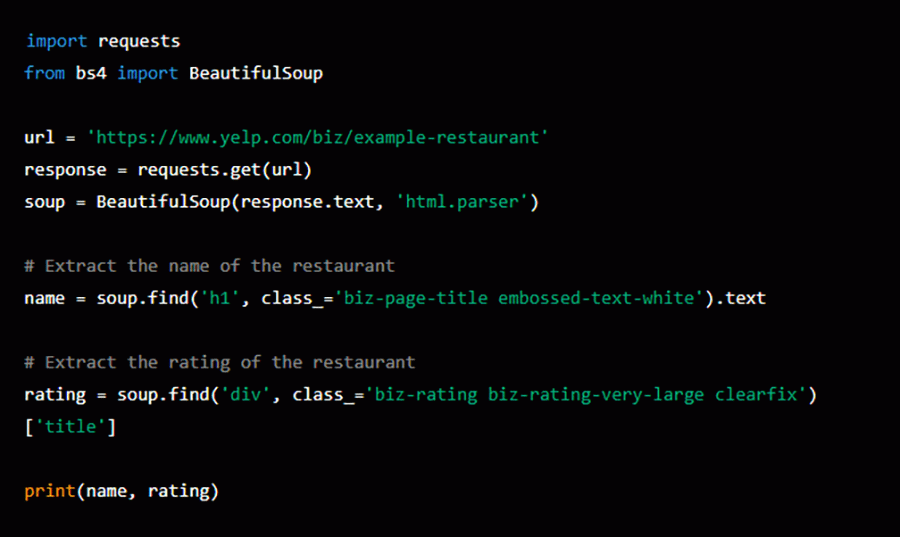
Yelp Scraping Using BeautifulSoup: Example
Here’s a simple example of how to use BeautifulSoup to scrape Yelp data:
Final Words
In conclusion, Yelp web scraping can be a valuable tool for businesses and data analysts. Still, it is important to remember that it is against Yelp’s terms of service and should only be used for lawful purposes.
By using tools such as Beautiful Soup, Selenium, Scrapy, or ParseHub and creating a script or template, it is possible to extract data from Yelp and analyze it for useful insights. However, extracting large amounts of web data requires preparation and understanding of how website protection works.
You also need to know how to get the most out of the data you collect. Our team knows how to work with large websites and large databases. Our specialists have extensive experience in extracting data in the most efficient way for our clients. Do you want to know how we do it? Contact us for free advice.
FAQ about How to Scrape Yelp Data in Python
What is Yelp scraping?
Yelp scraping refers to the process of extracting data from the Yelp website. This data can include information about local businesses such as their name, address, phone number, ratings, reviews, and other relevant details. Scraping Yelp data can be used for various purposes, such as market research, sentiment analysis, and even building a competitor analysis tool.
Are there any Yelp scraping Chrome extensions?
There may be some Chrome extensions that claim to scrape data from Yelp, but it’s important to note that scraping Yelp data may violate Yelp’s terms of service, and in some cases, it may also be illegal. Additionally, using a scraper can put your computer at risk by exposing it to malicious code or compromising your personal information.
If you’re interested in using Yelp data, it’s best to use the Yelp Fusion API, which provides authorized access to Yelp’s data. This way, you can access the data you need in a safe and legal manner, without putting your computer or personal information at risk.
How to use Yelp Fusion API for Data Scraping?
The Yelp Fusion API is a RESTful API that provides authorized access to Yelp’s data, including business information, reviews, and ratings. Here’s a high-level overview of the steps to use the Yelp Fusion API:
- Sign up for a Yelp account and apply for a Yelp Fusion API key.
- Review the Yelp Fusion API documentation to understand the available endpoints and the parameters they accept.
- Make an API request to the desired endpoint using the API key and any relevant parameters.
- Parse the API response to extract the desired information.
- Store or display the extracted information as desired.
To make an API request, you can use a variety of programming languages and libraries. For example, you can use the requests library in Python.
Stay ahead with data insights
Subscribe to DataOx newsletter




get a free consultation
Fill out the form — we'll get back to you with options tailored to your needs.
what happens next
We review your goals and get in touch to clarify scope
Your privacy is a priority — NDA available upon request.
You receive a clear proposal with timeline, budget, and delivery format.
Once approved, we start building your data pipeline.


contact us
Let's find the best solution for your data needs.
get a free consultation
Fill out the form — we'll get back to you with options tailored to your needs.
what happens next
We review your goals and get in touch to clarify scope
Your privacy is a priority — NDA available upon request.
You receive a clear proposal with timeline, budget, and delivery format.
Once approved, we start building your data pipeline.
contact us
Let's find the best solution for your data needs.