Back to blog
Scrape Yahoo Finance with Python and BeautifulSoup: All You Need to Know


Data Yahoo Finance: Why It Is So Valuable?
Financial data has always been among the most valuable resources in the market. If you make a proper analysis, you will have a significantly better chance chance to solve your organization’s financial issues and grow your business. Today, Yahoo Finance is one of the most popular financial web sources with free access. Through this article, we will build a web crawler to scrape Yahoo Finance real-time stock data and other most active Yahoo Finance data like world indices, currencies, and cryptocurrencies.
Let’s reveal what Yahoo Finance is, why to scrape financial data, and how to download data from Yahoo Finance with Python.

What is Yahoo Finance?
Yahoo Finance provides various financial data like currency trends, financial reports, finance stock quotes, general news from the financial market, etc. Whether you are a business owner or investor, you will always get interesting and valuable insights from the Yahoo Finance page or Yahoo Finance app.
Note: Yahoo Finance discontinued its official API in 2017. All scraping methods described in this article interact with Yahoo Finance’s public web pages directly. Keep in mind that Yahoo’s page structure may change over time, which can require updates to the code. Always review Yahoo Finance’s Terms of Service before scraping at scale. Yahoo Finance is a great starting point, but if you need broader market coverage delivered on a schedule, see our stock market data scraping solution.
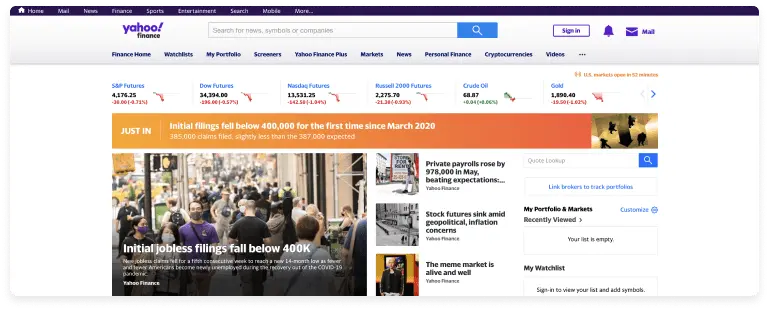
Reasons For Scraping Yahoo Finance
If you are working in finance or just interested in trading and investments, scraping Yahoo Finance page is a must. Financial data collected in real-time will enable you to have a wealth of information to make an up-to-date investment or financial analysis.
Scraping data from Yahoo Finance is especially needed for stock trading organizations that can download historical stock data from Yahoo Finance into Excel and make stock market predictions based on the fetched information.
To sum up the above, we can state that by scraping financial data you can make:
- Financial market research
- Stock market prediction

Web Scraping Yahoo Finance Python Solution
Before building a crawler, you need to import the following libraries: Pandas and BeautifulSoup. Pandas library is used to arrange the extracted data as tables, while the Beautiful Soup handles HTML parsing in Python. Additional requirement is Requests library to send HTTP requests to Yahoo Finance.
Install all required libraries with a single command:
pip install requests beautifulsoup4 pandas
Then import them at the top of your script:
import requests
from bs4 import BeautifulSoup
import pandas as pd
A note on request headers: Yahoo Finance may block requests that do not look like they come from a real browser. Always include a User-Agent header to avoid getting blocked:
headers = {
"User-Agent": "Mozilla/5.0 (Windows NT 10.0; Win64; x64) "
"AppleWebKit/537.36 (KHTML, like Gecko) "
"Chrome/120.0.0.0 Safari/537.36"
}
Dynamic content: Yahoo Finance renders a significant part of its data with JavaScript after the loading of the initial page. BeautifulSoup only parses static HTML so if a value seems to be missing in your results, it is likely loaded dynamically. In those cases you will need a browser automation tool like Selenium to fully render the page before parsing.
Cryptocurrencies
A digital currency known as cryptocurrency is a localized system founded on blockchain tech with advanced protection. It is a global phenomenon with considerable growth in recent years, attracting many investors.
The code below scrapes the cryptocurrency listings from Yahoo Finance’s dedicated crypto page. It targets table rows in the HTML and extracts name, price, change, and percent change for each entry.
import requests
from bs4 import BeautifulSoup
import pandas as pd
headers = {
"User-Agent": "Mozilla/5.0 (Windows NT 10.0; Win64; x64) "
"AppleWebKit/537.36 (KHTML, like Gecko) "
"Chrome/120.0.0.0 Safari/537.36"
}
url = "https://finance.yahoo.com/crypto/"
response = requests.get(url, headers=headers)
soup = BeautifulSoup(response.text, "html.parser")
names, prices, changes, percent_changes = [], [], [], []
for row in soup.select("tbody tr"):
cols = row.find_all("td")
if len(cols) >= 5:
names.append(cols[1].get_text(strip=True))
prices.append(cols[2].get_text(strip=True))
changes.append(cols[3].get_text(strip=True))
percent_changes.append(cols[4].get_text(strip=True))
df = pd.DataFrame({
"Name": names,
"Price": prices,
"Change": changes,
"% Change": percent_changes
})
print(df)
Currencies
The approach to scraping the currency data is the same as in the above case. Yahoo Finance lists currency pairs on a dedicated page. The code below extracts currency pair names, prices, and change values by targeting the data table rows:
import requests
from bs4 import BeautifulSoup
import pandas as pd
headers = {
"User-Agent": "Mozilla/5.0 (Windows NT 10.0; Win64; x64) "
"AppleWebKit/537.36 (KHTML, like Gecko) "
"Chrome/120.0.0.0 Safari/537.36"
}
url = "https://finance.yahoo.com/markets/currencies/"
response = requests.get(url, headers=headers)
soup = BeautifulSoup(response.text, "html.parser")
names, prices, changes, percent_changes = [], [], [], []
for row in soup.select("tbody tr"):
cols = row.find_all("td")
if len(cols) >= 5:
names.append(cols[0].get_text(strip=True))
prices.append(cols[1].get_text(strip=True))
changes.append(cols[2].get_text(strip=True))
percent_changes.append(cols[3].get_text(strip=True))
df = pd.DataFrame({
"Name": names,
"Price": prices,
"Change": changes,
"% Change": percent_changes
})
print(df)
World Indices
MSCI World is a market cap-weighted index of 1,649 stocks. The index and its dynamics show the attitude of investing in companies of any size and field.
The code below will enable scraping world indices’ data like prices, changes in percentage, and market volume.
import requests
from bs4 import BeautifulSoup
import pandas as pd
headers = {
"User-Agent": "Mozilla/5.0 (Windows NT 10.0; Win64; x64) "
"AppleWebKit/537.36 (KHTML, like Gecko) "
"Chrome/120.0.0.0 Safari/537.36"
}
url = "https://finance.yahoo.com/markets/world-indices/"
response = requests.get(url, headers=headers)
soup = BeautifulSoup(response.text, "html.parser")
names, prices, changes, percent_changes = [], [], [], []
for row in soup.select("tbody tr"):
cols = row.find_all("td")
if len(cols) >= 5:
names.append(cols[0].get_text(strip=True))
prices.append(cols[1].get_text(strip=True))
changes.append(cols[2].get_text(strip=True))
percent_changes.append(cols[3].get_text(strip=True))
df = pd.DataFrame({
"Name": names,
"Price": prices,
"Change": changes,
"% Change": percent_changes
})
print(df)
Most Active Stocks
The shares on the exchange with the highest volume for a certain period are the most active. Because of the value of the latest information affecting the entry of stocks into the market, stock trading volumes grow above average, which induces investors to sell or buy shares at high returns.
The code for scraping most active stocks with such details as symbol, name, price, change, percent change, market cap, and average volume, is coming below.
import requests
from bs4 import BeautifulSoup
import pandas as pd
headers = {
"User-Agent": "Mozilla/5.0 (Windows NT 10.0; Win64; x64) "
"AppleWebKit/537.36 (KHTML, like Gecko) "
"Chrome/120.0.0.0 Safari/537.36"
}
url = "https://finance.yahoo.com/markets/stocks/most-active/"
response = requests.get(url, headers=headers)
soup = BeautifulSoup(response.text, "html.parser")
symbols, names, prices, changes, percent_changes, market_caps, avg_volumes = \
[], [], [], [], [], [], []
for row in soup.select("tbody tr"):
cols = row.find_all("td")
if len(cols) >= 7:
symbols.append(cols[0].get_text(strip=True))
names.append(cols[1].get_text(strip=True))
prices.append(cols[2].get_text(strip=True))
changes.append(cols[3].get_text(strip=True))
percent_changes.append(cols[4].get_text(strip=True))
market_caps.append(cols[5].get_text(strip=True))
avg_volumes.append(cols[6].get_text(strip=True))
df = pd.DataFrame({
"Symbol": symbols,
"Name": names,
"Price": prices,
"Change": changes,
"% Change": percent_changes,
"Market Cap": market_caps,
"Avg Volume": avg_volumes
})
print(df)
Scraping Individual Stock Quotes
Yahoo Finance uses a custom <fin-streamer> HTML tag to display live price data on individual stock quote pages. The example below shows how to extract the current price, change, and percent change for any ticker:
import requests
from bs4 import BeautifulSoup
headers = {
"User-Agent": "Mozilla/5.0 (Windows NT 10.0; Win64; x64) "
"AppleWebKit/537.36 (KHTML, like Gecko) "
"Chrome/120.0.0.0 Safari/537.36"
}
ticker = "AAPL"
url = f"https://finance.yahoo.com/quote/{ticker}"
response = requests.get(url, headers=headers)
soup = BeautifulSoup(response.text, "html.parser")
price = soup.find("fin-streamer", {"data-field": "regularMarketPrice"})
change = soup.find("fin-streamer", {"data-field": "regularMarketChange"})
pct_change = soup.find("fin-streamer", {"data-field": "regularMarketChangePercent"})
print(f"Ticker: {ticker}")
print(f"Price: {price.text if price else 'N/A'}")
print(f"Change: {change.text if change else 'N/A'}")
print(f"% Change: {pct_change.text if pct_change else 'N/A'}")
If necessary, this approach can be looped over a list of tickers to collect quote data across multiple companies.

How to Scrape Yahoo Finance without Python
If you have no coding skills, there are other options as well.
- Buy a scraping tool
- Hire a web scraping developer
- Outsource to data scraping service providers
Except for Yahoo Finance, there are other financial data sources providing valuable insights like Bloomberg, TMXMoney, Google Finance, and much more. Keep in mind that scraping financial data has its challenges and issues and, of course, should be done in the maximum accurate way. So if you are not sure that you can handle it yourself, trust it to professionals. If you’d rather not maintain this script yourself, our team offers scraping financial data as a fully managed service — same data, zero maintenance.
Professional Solutions to Scrape Data Yahoo Finance
Extracting and analyzing data from financial sources can help organizations make financial market sentiment analyses and do equity research.
Anyway, the financial market is full of instability and risks. Financial data scraping can be the ideal solution to have all the necessary data on hand.
At DataOx we are always ready to help you with scraping financial data. Schedule a free consultation with our expert to reveal the complete list of our web scraping services and learn how DataOx can help you scrape financial data in accordance with your business goals.

web scraping services
Get free consultation
FAQ about Scraping Yahoo Finance with BeautifulSoup and Python
Is it possible to scrape Yahoo Finance data?
Yes, though it requires the right approach. Yahoo Finance discontinued its official API in 2017, so there is no direct data endpoint to call. Luckily, web scraping Yahoo Finance Python solutions, specifically Python libraries (Requests and BeautifulSoup), works steadily, though periodical updates of page structure can still be a problem. DataOx builds and maintains Yahoo Finance scrapers and custom solutions that stay functional through site changes and deliver clean structured data on a schedule you define.
How do you scrape Yahoo Finance without getting blocked?
Yahoo Finance detects requests that do not resemble real browser traffic. A missing or generic User-Agent header is usually enough to get a response blocked or restricted. Additionally, rate limiting and IP rotation matter too: sending too many requests in a short time triggers fast detection. DataOx handles this with proxy rotation, request pacing, and session management that are built into every web scraping Yahoo Finance project we run.
What Yahoo Finance data can actually be extracted with BeautifulSoup?
Quite a lot, mostly static content (most active stocks, currency pairs, world indices, crypto listings, and individual stock quote snapshots). However, there are limitations with getting dynamic data from Yahoo Finance: real-time chart values and some deeper financial statement fields. DataOx assesses which extraction method fits each data type to prevent most of the common scraping failures.
How often can you deliver scraped Yahoo Finance data?
Delivery frequency depends on what you actually need. Some clients that are occupied with stock market prediction models need updated data every few minutes, others doing periodic financial market research pull once a day. DataOx configures scrape Yahoo Finance pipelines around your schedule so it actually fits specifically your workflow. The data delivery options are CSV, JSON, XLSX, directly into a database, or custom variants — discuss your needs with us!
What do I do if my Yahoo Finance scraper stops working after a site update?
The fix requires re-inspecting the page, identifying updated tags or class names, and adjusting the parsing logic. DataOx includes scraper maintenance as part of ongoing projects: we fix the cause and you get data delivery regardless of what Yahoo changes on their end.
Stay ahead with data insights
Subscribe to DataOx newsletter




get a free consultation
Fill out the form — we'll get back to you with options tailored to your needs.
what happens next
We review your goals and get in touch to clarify scope
Your privacy is a priority — NDA available upon request.
You receive a clear proposal with timeline, budget, and delivery format.
Once approved, we start building your data pipeline.


contact us
Let's find the best solution for your data needs.

get a free consultation
Fill out the form — we'll get back to you with options tailored to your needs.
what happens next
We review your goals and get in touch to clarify scope
Your privacy is a priority — NDA available upon request.
You receive a clear proposal with timeline, budget, and delivery format.
Once approved, we start building your data pipeline.
contact us
Let's find the best solution for your data needs.